
Home
Pick up where you left off
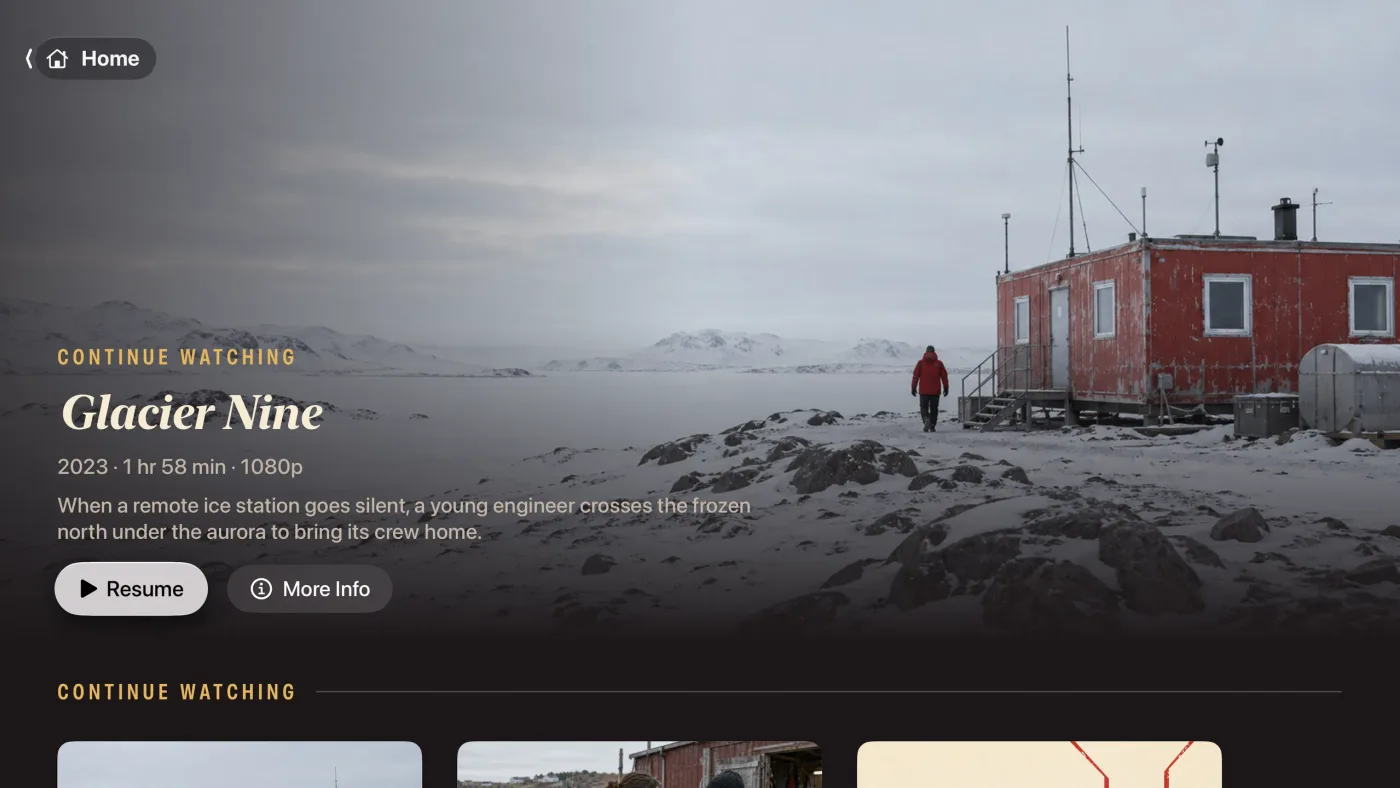
Continue Watching leads Home, so the film you paused halfway through and the episode you started are right there. Your favorites and the rest of your library fill the shelves below.

Your own movies and shows, in a library with posters, seasons, and a place to pick up where you left off. Send videos to your Apple TV from any browser, or add the folders on your Mac.
 For Apple TV
Free for up to 10 titles. Matinee Pro removes the limit with a one-time purchase, sold separately: $9.99 on Apple TV, $15.00 on Mac. Requires tvOS 18 or macOS 15 or later. User manual
Two apps
Matinee on Apple TV keeps copies of the videos you send it. Matinee on a Mac plays your files where they are. Each app has its own library.
Matinee for Apple TV
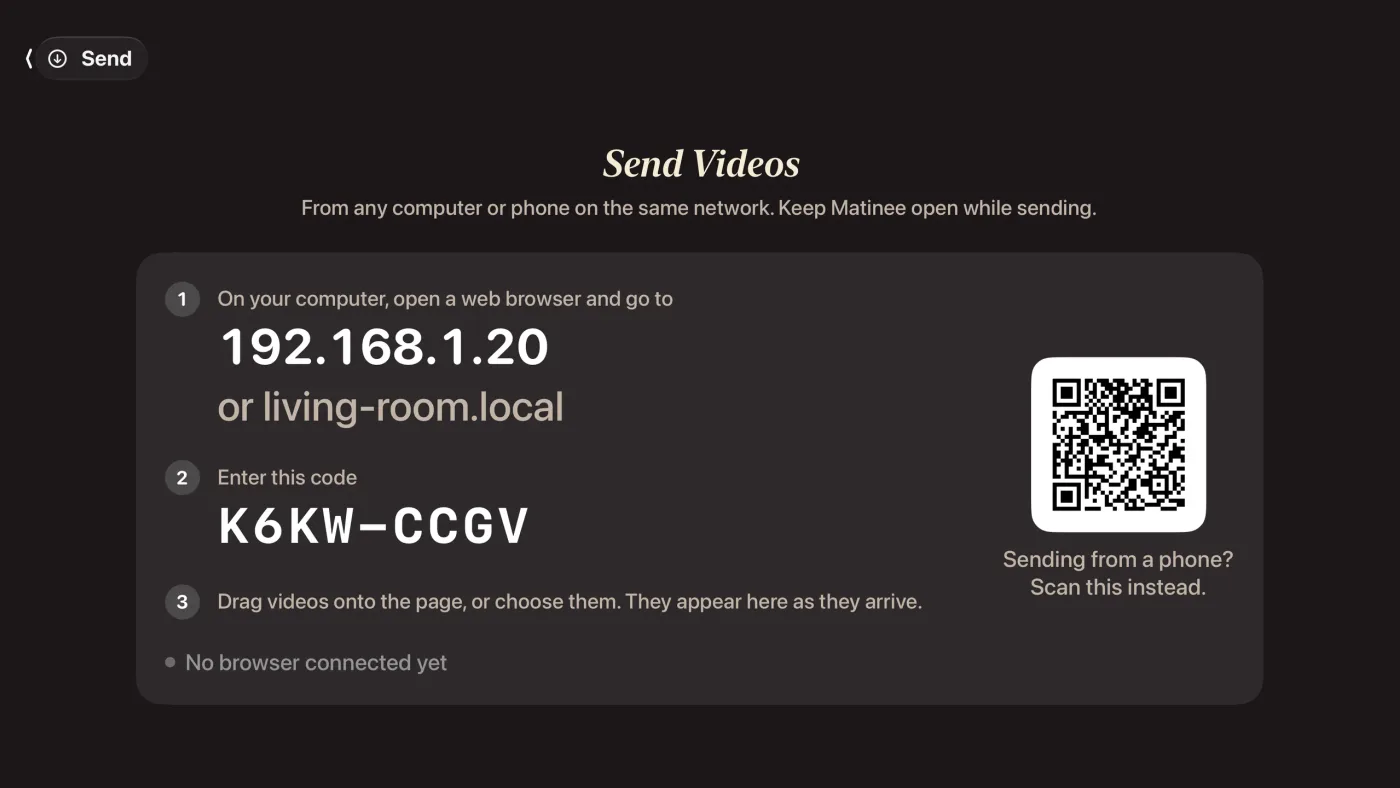
Open Matinee’s upload page in a browser on your home network and send videos straight to your Apple TV. No cables or separate file server needed.
Sold separately from the Mac app. Requires tvOS 18 or later. User manual
Open the address shown on your TV in a browser on the same network. On a phone or tablet, you can scan the QR code instead.
Enter the code shown on your TV to pair the browser. It stays paired for your next visit. No account or extra software needed.
Add videos or whole folders, along with any subtitle files. They travel straight to your Apple TV over your home network and appear in the library as they arrive. Anything the TV already has is skipped.
How to transfer videos to Apple TV from a browser
Matinee for Mac
Add the video folders on your drives, and Matinee makes them a library with posters and show grouping, plus a player for every format VLC plays. It reads your files where they are and never moves, renames, or deletes them.
Sold separately from the Apple TV app. Requires macOS 15 or later. User manual
Download the disk image, open it, and drag Matinee to your Applications folder.
Choose Add Folder… or drag folders onto the window. They can be on your Mac, on an external drive, or on a mounted network share.
Posters and episode details arrive from TheTVDB, and videos you add to those folders appear on their own. Home keeps your place.

Now showing
Home
Continue Watching leads Home, so the film you paused halfway through and the episode you started are right there. Your favorites and the rest of your library fill the shelves below.

Movies
Matinee reads the file name and finds the film’s poster, backdrop, and synopsis. To correct a title, use Fix Match on Apple TV, or rename the file on a Mac.
Shows
Episodes are grouped into shows and seasons automatically. When file names don't include a show's title, Matinee uses the folder name. Watched episodes are ticked off as you go.


Library
Browse your movies, shows, and home videos in one library. Filter to unwatched videos or favorites, and sort by recently added or title. Videos with no poster get a blank ticket with their name beneath it.
Manage on Apple TV
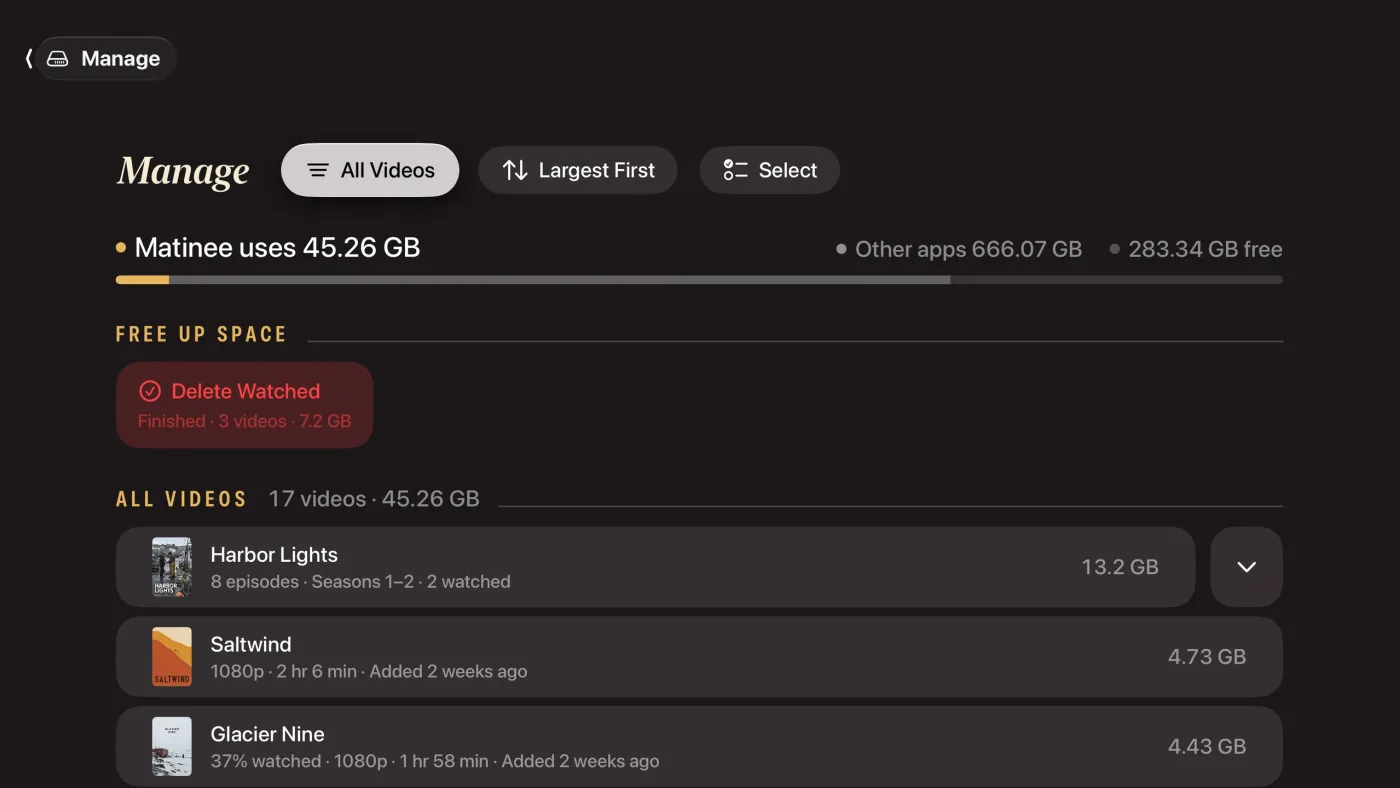
On Apple TV, the Manage screen shows how much space Matinee is using and which videos use the most. Delete what you've finished in one go, or pick titles to clear by hand.
Inside
Your existing video files play in a wide range of formats, on Apple TV and Mac.
Admission
The whole app, free, for up to 10 titles. A show counts as one title, regardless of its episode count. You can keep adding episodes to shows already in your library. On a Mac, videos you open from Finder or the Dock always play.
Matinee Pro
One-time purchase. Unlimited titles, no subscription. Buy it on your Apple TV, or as a license key for your Mac. Each app has its own Pro, so buying it for one doesn't unlock the other.
Questions and answers
Connect your phone or computer to the same network as your Apple TV. Open the address Matinee shows and enter the pairing code, or scan the QR code on your phone. Choose videos to send, or drag in files and folders from a computer.
Yes. VLC’s playback engine lets Matinee play MKV, MP4, MOV, AVI, WebM, TS, MPEG, and other formats.
Yes. Use subtitles embedded in your video, or add separate SRT, ASS, SSA, and VTT files. On Apple TV, send them with the video or later. On a Mac, keep them beside the video.
On Apple TV, Matinee stores its video copies on the TV. Manage shows storage use and lets you delete titles individually or clear watched videos. Keep your originals so you can resend them if tvOS removes stored files to free space. On a Mac, Matinee plays your files from their folders and makes no copies.
Each movie counts as one title. A show also counts as one, regardless of its episode count, and you can keep adding episodes to it. Unlock unlimited titles with a one-time Matinee Pro purchase: $9.99 on Apple TV, $15.00 on Mac.
Only if you want it on both. The Apple TV and Mac apps are sold separately, each with its own library and its own Matinee Pro, at $9.99 on Apple TV and $15.00 on Mac, so buying it for one doesn't unlock the other. Both are free for up to 10 titles.
Buy Matinee Pro and your license key arrives by email. In Matinee, open Settings › License, paste the key into the License Key field, and click Activate. To move it to another Mac, click Deactivate… on the old one first.
Find step-by-step help in the manual for sending videos, adding subtitles, and managing Apple TV storage.
On a Mac, see installing Matinee, your license key, and software updates.
Now showing
Free for up to 10 titles on Apple TV and Mac. A one-time unlock for unlimited titles is $9.99 on Apple TV and $15.00 on Mac.